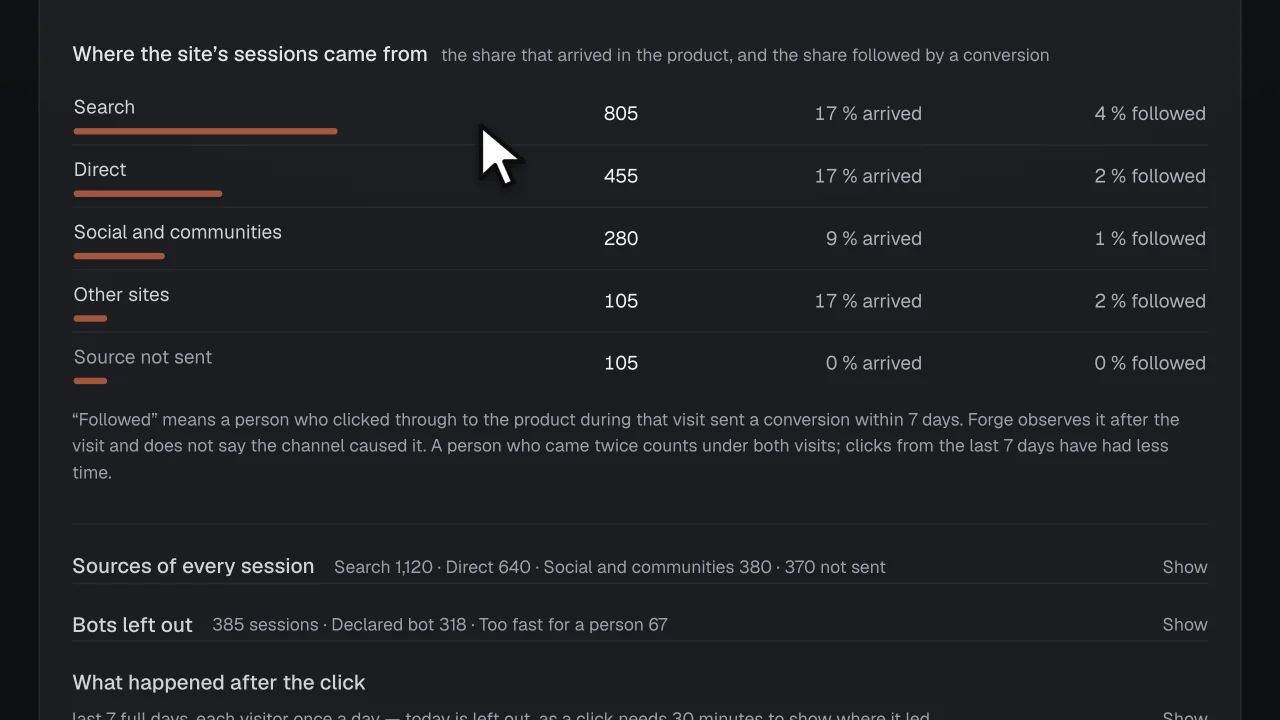
How a session gets its source
The tracker marks the first page view of a visit with the site it came from and the link’s utm tags. Forge keeps only the referring site’s host, never the full address. A visit that crosses from your site into your product within 30 minutes keeps the source it arrived with. The utm tags are kept as text, scrubbed.
The host and the tags are looked up in one versioned table of channels:
- Search. Came from a search engine (Google, Bing, DuckDuckGo…).
- AI assistants. Came from an AI assistant (ChatGPT, Perplexity, Claude…).
- Social and communities. Came from a social network or community (X, Reddit, LinkedIn, Hacker News…).
- E-mail. Came from web mail opened in a browser (Gmail, Outlook…). Mail apps send no source, so their visits count as Direct.
- Tagged links. The link carried utm tags. Your team may have tagged it, or the site that linked added them.
- Other sites. Came from another website.
- Your own site. Came from another page of the same site, or from the product’s website (Settings · Product).
- Direct. No source was sent: the address was typed or bookmarked, or the link came from an app.
From the source to a conversion
Your app says what a conversion is by sending one, with its value and currency. For the sessions that started on your site, Forge then shows three things per source: its sessions, the share that arrived in your product, and the share followed by a conversion. A source with under 20 sessions gets no share.
“Followed” means the person who clicked through during that visit sent a conversion within 7 days. A person who came twice counts under both visits, and clicks from the last 7 days have had less time; the screen says both.
forge.track('$conversion', { value: 49, currency: 'EUR' })When a source falls
By default, Forge opens an issue when a channel’s sessions over the last 7 days fall at least 30 % against the 7 days before, from at least 50 sessions in those earlier days. Below that, or before a source was first read, it opens nothing and says why.
You can set a weekly sessions target for one channel; Forge shows how far the count is from it, over whole weeks.
Where Forge stops
This is a count of what followed a visit, and it stays one:
- It is not attribution. No first-touch, last-touch or weighted model, and no credit handed to a channel.
- Forge reads no ad account: no spend, no cost per click, no return on ad spend.
- The value is what your app sent, shown per currency and never added across currencies. Forge does not call it revenue.
- A session whose first page view carries no mark from the tracker is “source not sent”: Forge could not read it, so it is not counted as Direct. Reading it needs tracker 0.4.0 or later in the browser.
- Mail apps send no source, so a visit from one counts as Direct.
Questions
- Do I need to tag my links?
- No. The site a visit came from gives it a channel on its own. utm tags add the campaign, and a link from a mail app or another app needs them to count as anything but Direct.
- Why not say which channel caused the conversion?
- Because the rows cannot show it. They show that a visit from a source was followed by a conversion; the same person may have come from three places that week. Forge states the count and leaves the cause to you.
- What do I have to send?
- The tracker, version 0.4.0 or later, on your site and in your app, the hand-over set on the site’s tracker so a click can be followed into the product, and one event where a conversion happens.
- What does it cost?
- Free for 1 product, no card: the tracking, the issues, the releases and their outcomes, up to 20,000 rows a day. Solo is $29 a month, flat, for 3 products and 100,000 rows a day each. Nothing is metered and there are no credits; the one paid addition to oversight is the model’s draft of a work spec.
- What happens to my users’ data?
- Person and session ids are hashed together with your product’s id before they are stored, the IP address is never read, and e-mail addresses, IP addresses, query strings (except a tagged link’s utm_source, utm_medium and utm_campaign, kept scrubbed) and anything shaped like a secret are removed from the texts. Rows are kept 30 days on Free, 90 on Solo, 180 on Team and 365 on Premium. No screen in Forge shows a person, lists the people behind a count, or ranks them.