Why the two halves rarely meet
A landing page and the app behind it usually live on two addresses, and a browser keeps a tracker’s id per address. The same visitor is one person on the site and another in the app, so a funnel from a landing page to a sign-up reads as if nobody got through.
The part that matters most is the one in between: a visitor clicks “Start free” and the product never reports them. Without the two halves joined, that click looks like any other.
How a click is followed
The site’s tracker is told which hosts are your product. On a click toward one of them it records the click and adds its own anonymous id to the link; the product’s tracker reads it, removes it from the address at once and records the arrival. Both use the same tracking key.
Only an anonymous id the tracker made is ever put in a link. A signed-in visitor’s click is counted apart and not followed.
// the site
createForgeTracker({ token: 'ftk_…', handoff: { to: ['app.example.com'] } })
// the product: nothing to add
createForgeTracker({ token: 'ftk_…' })
What the Overview shows
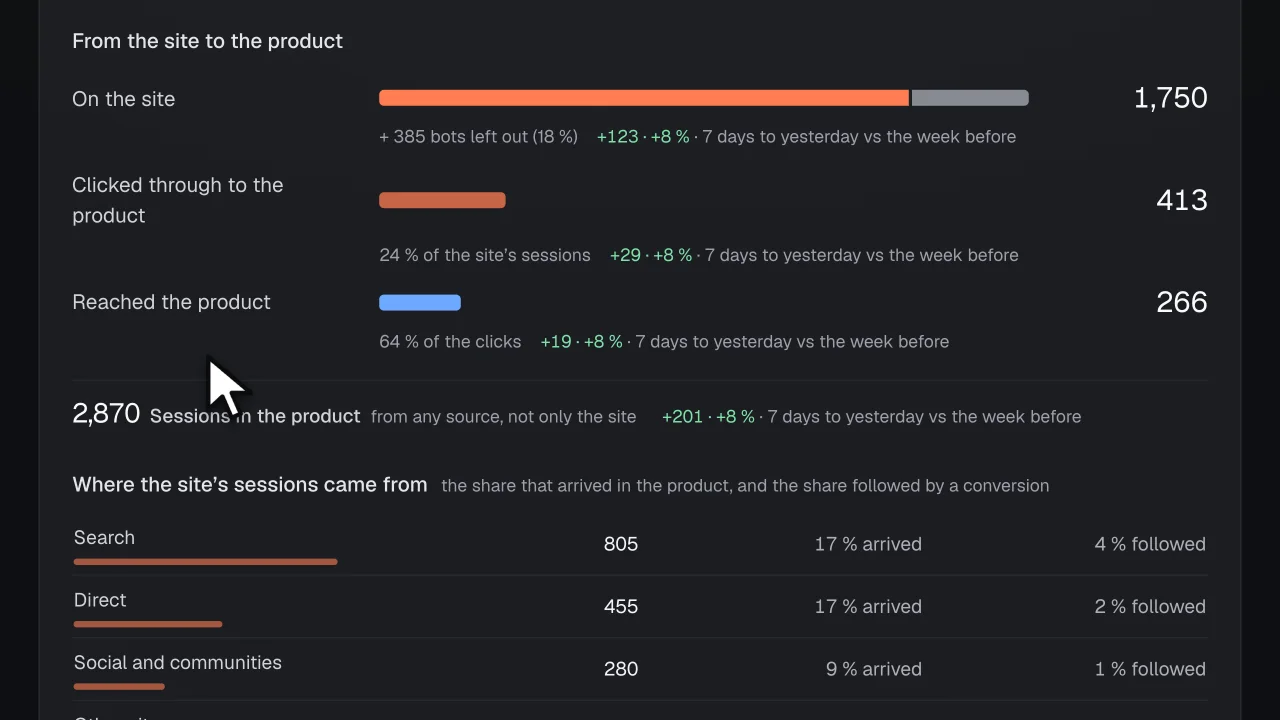
The funnel is counted in sessions over the period you choose (today, 7 or 30 days), today included. The change beside each figure compares the whole days to yesterday with the same number of days before:
- On the site. The sessions with a visit to your site, and beside them the bots left out.
- Clicked through to the product. The sessions with a followed click toward your product, as a share of the site’s sessions.
- Reached the product. The clicks your app reported arriving, as a share of the clicks.
- In the product. The sessions your app saw, from any source and with the bots left out, stated apart so it is not read as the funnel’s last step.
What happened after the click
Over the last 7 whole days, each visitor who clicked is counted once a day and given one reading from their own rows in the 30 minutes after the click. Shares are stated from 20 clicks; below that Forge shows the counts alone.
- Arrived in the product. The product reported the visitor's arrival within 30 minutes of the click, with no error row.
- Arrived, then an error. The product reported the arrival, and the same visitor sent an error row within 30 minutes of the click.
- Arrived, then a server error. The product reported the arrival, and the server sent an error row for the same visitor within 30 minutes of the click: the request carried their id (x-forge-id).
- An error, never arrived. No arrival was reported; the same visitor sent an error row within 30 minutes of the click, on the site or in the product before it could report.
- Stayed on the site, never arrived. No arrival and no error; the visitor sent other rows after the click: they stayed on the site or came back to it.
- Nothing received after the click. Nothing from the visitor after the click. Forge cannot tell whether the product failed before its tracker started or the visitor closed the page.
When fewer arrive
By default, Forge opens an issue when the share of clicks that arrived falls 5 points or more over 7 days against the 7 days before, with at least 50 clicks in each. With fewer clicks in either week, or a day in them on which rows were refused over the plan’s cap, it opens nothing and says why.
The issue shows these readings for the latest week and the errors that followed the clicks, those after the most clicks that never arrived first. After the release that ships a change, the arrival share is measured again, before against after.
Where Forge stops
It reads rows, and says no more than they hold:
- “Nothing received after the click” says only that no row came. The product may have failed before its tracker started, or the visitor closed the page; the rows are the same, so Forge names both.
- “Stayed on the site” is a fact about rows, not about interest.
- Counts only. No visitor’s trail is shown, and ids are hashed per product.
- A signed-in visitor’s click is not followed, because their id is never put in a link.
- Today is left out of what happened after the click: a click needs its minutes to show where it led.
- An error after a click is stated beside it, never ranked as the reason the visitor left.
Questions
- Do my site and my app need to be on the same domain?
- No. That is what the hand-over is for: the id travels in the link, so a site on one address and an app on another are read as the same visitor.
- What is added to my links?
- One parameter, forge_h, holding the anonymous id the site’s tracker made. The product’s tracker removes it from the address as it loads. An id your app set for a signed-in person is never put there.
- What do I have to set up?
- The tracker, version 0.3.0 or later, on the site and in the app with the same tracking key, and your product’s hosts named on the site’s tracker. The funnel shows as soon as your site sends; what happened after the click appears once a click is stored.
- What does it cost?
- Free for 1 product, no card: the tracking, the issues, the releases and their outcomes, up to 20,000 rows a day. Solo is $29 a month, flat, for 3 products and 100,000 rows a day each. Nothing is metered and there are no credits; the one paid addition to oversight is the model’s draft of a work spec.
- What happens to my users’ data?
- Person and session ids are hashed together with your product’s id before they are stored, the IP address is never read, and e-mail addresses, IP addresses, query strings (except a tagged link’s utm_source, utm_medium and utm_campaign, kept scrubbed) and anything shaped like a secret are removed from the texts. Rows are kept 30 days on Free, 90 on Solo, 180 on Team and 365 on Premium. No screen in Forge shows a person, lists the people behind a count, or ranks them.